


USB (Universal Serial Bus) is a standard for cables, connectors, and communication protocols used to connect and transfer data and power between computers and electronic devices. USB has evolved over time with different versions and connector types. This article provides an overview of the most commonly used USB versions and connector types.
USB 1.0 was introduced in 1996 and had a maximum data transfer speed of 1.5 Mbps (low-speed) and 12 Mbps (full-speed). It was quickly updated to USB 1.1 in 1998, which fixed errors and improved compatibility. These versions are now obsolete.
USB 2.0USB 2.0 was launched in 2000 and increased the data speed to 480 Mbps. It is still a very widespread standard, especially for simple devices such as keyboards, mice, and USB drives. USB 2.0 is backward compatible with USB 1.x.
USB 3.0USB 3.0 arrived in 2008 and introduced a significantly higher speed of up to 5 Gbps (SuperSpeed). It uses multiple data lanes and typically has blue connectors to distinguish them from older versions. USB 3.0 is backward compatible with USB 2.0.
USB 3.1USB 3.1 was released in 2013 and doubled the speed to 10 Gbps. It also introduced the USB Type-C connector (described further below), which is reversible and can transfer both data, power, and video. USB 3.1 is backward compatible with USB 3.0 and 2.0.
USB 3.2USB 3.2 was presented in 2017 and increased the transfer speed to up to 20 Gbps. It also uses USB-C connectors and introduced several "Gen" designations, which has caused some confusion. It is still compatible with older versions, but often requires specific cables and ports for maximum speed.
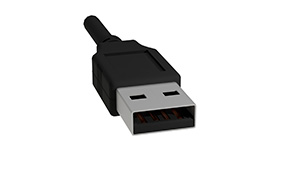
Type-A is the classic, rectangular USB connector, typically used in computers, TVs, chargers, etc. It is available in versions such as USB 1.1, 2.0, 3.0, and 3.1. Type-A only fits one way and is often used at one end of USB cables.
USB Type-B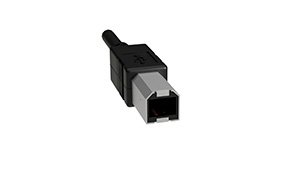
Type-B is more square and is typically used for printers, scanners, and external hard drives. It also comes in variants such as Mini-B and Micro-B, which became popular in older mobile phones and cameras.
USB Mini-B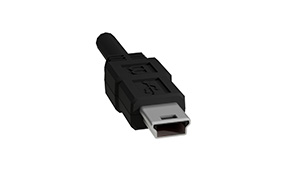
A smaller version of Type-B, used in older cameras and handheld devices. It is now largely phased out.
USB Micro-B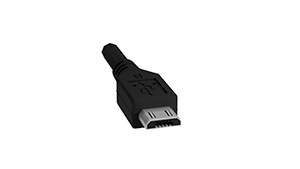
Even smaller than Mini-B, and was the standard for Android phones and tablets for many years. Micro-USB has slowly been replaced by USB Type-C.
USB 3 Type-B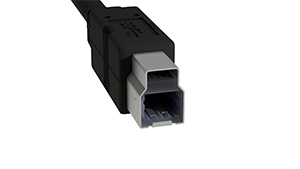
USB 3 Type-B resembles the classic Type-B connector but has an extended shape with five extra contact points. It is mainly used for external hard drives and docking stations where high data speed is necessary. It is not physically compatible with USB 2.0 Type-B ports, but is backward compatible via adapter or cable.
USB 3 Micro-B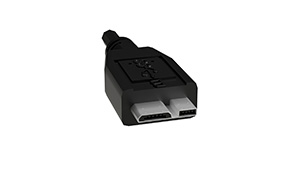
USB 3 Micro-B is an extension of the regular Micro-B connector, where an extra section with an additional five pins has been added. It is typically seen on external 2.5" hard drives and SSD devices that require faster transfer. It supports up to 5 Gbps and requires a specific USB 3 cable.
USB Type-C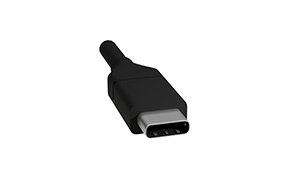
USB-C is the newest and most flexible connector type. It is reversible (can be inserted both ways) and supports high transfer speeds, charging (USB Power Delivery), and video output (DisplayPort/HDMI over USB-C). It is used in everything from laptops and smartphones to docking stations and external monitors.
USB has evolved from a simple connection for keyboard and mouse to an advanced standard that supports lightning-fast data transfer, charging, and video output. For the consumer, this means it is important to know both the version (e.g. USB 3.1) and the connector type (e.g. USB-C) to get the most out of their devices and cables.